
How to Set Permissions on the Backblaze Folder (Windows)
- 20 May 2024
- Print
- DarkLight
How to Set Permissions on the Backblaze Folder (Windows)
- Updated on 20 May 2024
- Print
- DarkLight
Article summary
Did you find this summary helpful?
Thank you for your feedback
Issues getting your changes in the Backblaze Computer Backup software settings to persist may be caused by file permissions on the Backblaze folder. Backblaze writes to the settings file when you make a change.
Repair Permission Settings
- On your windows machine, open File Explorer and navigate to This PC.
- Go to
C:/Program Files(86x)/Backblaze. - Right-click the folder, and select Properties.
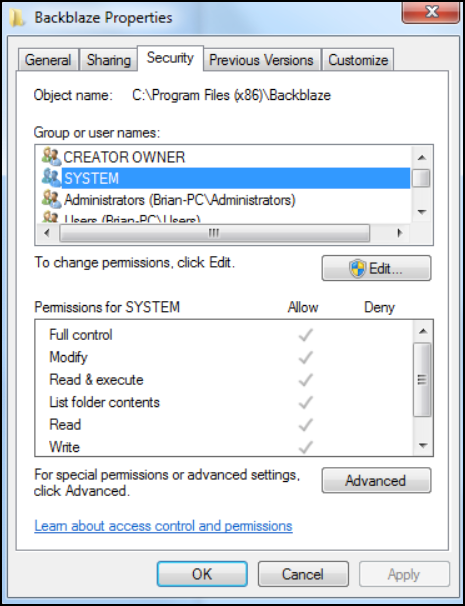
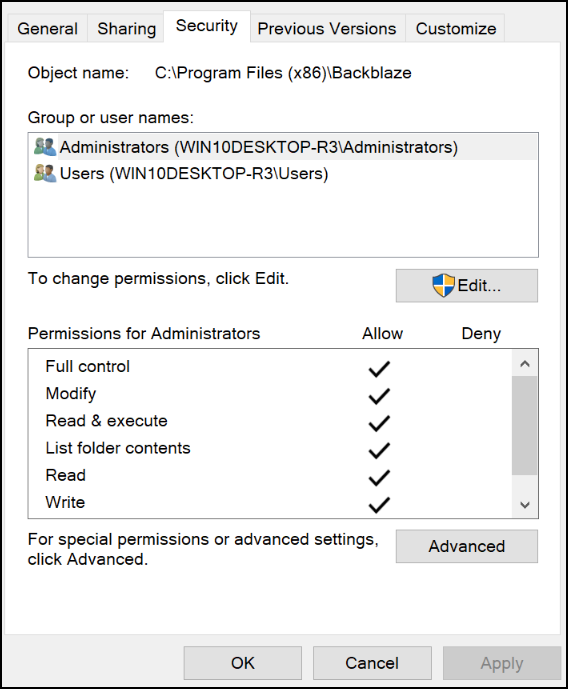
- Select the Security tab, and match the permission settings for SYSTEM and ADMINISTRATORS to the below images.
- Go to
C:/ProgramData/Backblaze. - Unhide the
C:/ProgramData/Backblaze folder. - Right-click the folder, and select Properties.
- Select the Security tab, and match the permission settings for SYSTEM and ADMINISTRATORS to the below images.
Was this article helpful?