
OIDC Workload Identity with Backblaze IAM
- 05 Nov 2026
- Print
- DarkLight
OIDC Workload Identity with Backblaze IAM
- Updated on 05 Nov 2026
- Print
- DarkLight
Article summary
Did you find this summary helpful?
Thank you for your feedback
Use OpenID Connect workload identity federation to exchange an identity-provider JWT for short-lived Backblaze IAM credentials. Workloads can access Backblaze B2 Cloud Storage without storing permanent IAM access keys.
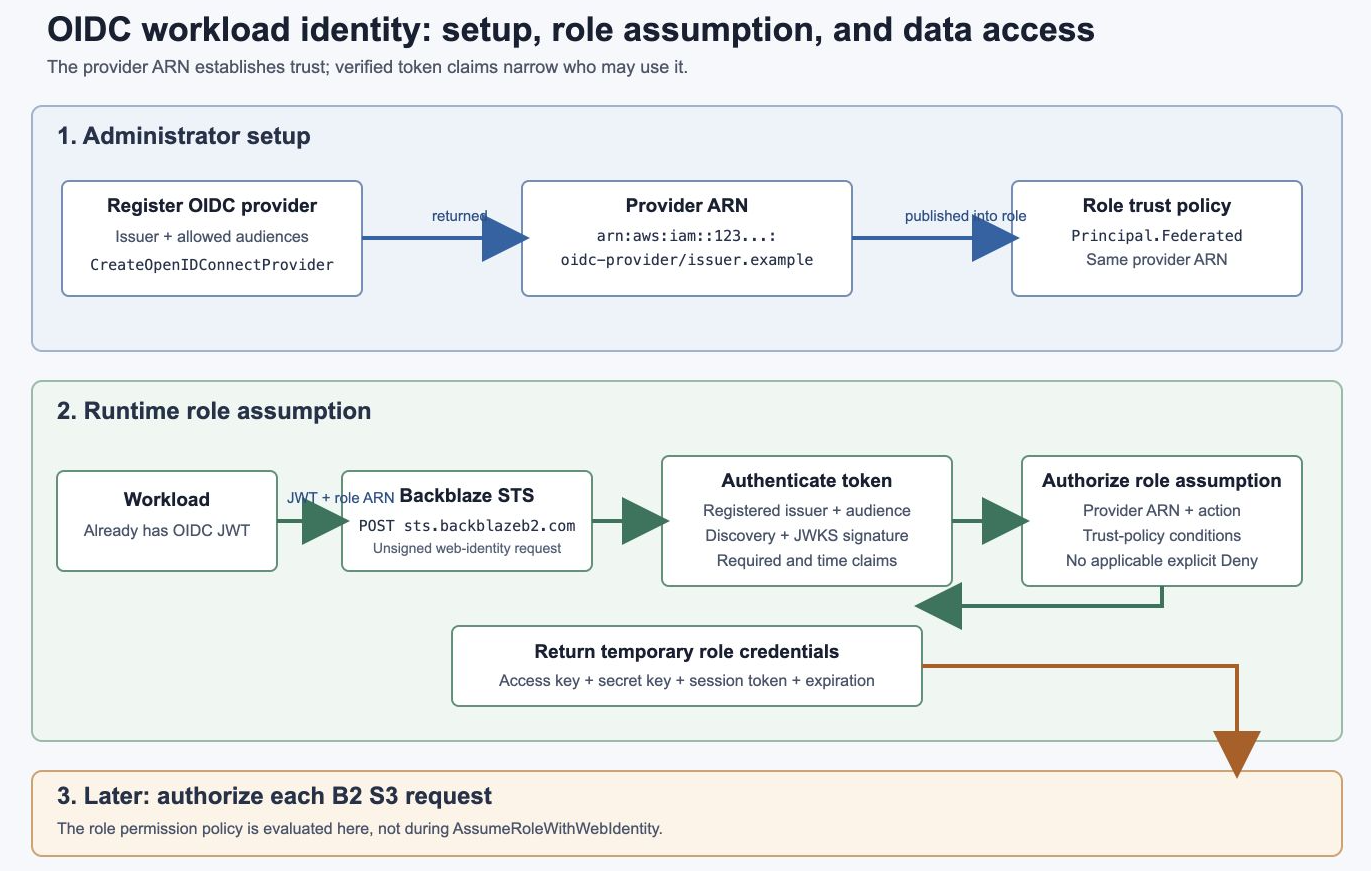
How it works
An administrator registers an OIDC provider and creates an IAM role that trusts it. The workload obtains a JWT from that provider and sends it to Backblaze STS.
Backblaze STS processes the request as follows:
Verifies the JWT against the provider’s public signing keys.
Confirms the issuer and audience match the registered provider.
Confirms the role trusts that provider.
Evaluates audience, subject, and other trust-policy conditions.
Returns temporary role credentials.
The workload then uses those credentials with the Backblaze B2 S3-compatible API.
How the provider and role are connected
Registering an OIDC provider returns a provider ARN:
arn:aws:iam::123456789012:oidc-provider/issuer.example.comThe role trust policy contains the same ARN under Principal.Federated.
Configuration | Purpose |
|---|---|
Issuer URL | Matches the JWT |
Client-ID list | Allows the effective |
Provider ARN | Connects the registered provider to the role |
Trust conditions | Restrict which workloads may assume the role |
Role permissions | Control what temporary credentials may do |
Without trust conditions, any valid token from that provider may assume the role if its effective audience is registered and no explicit Deny applies.
Authentication and authorization
The STS exchange performs two checks:
Authentication: Verify the JWT and identify the registered provider.
Role-assumption authorization: Evaluate the role trust policy.
The role permission policy is evaluated later, when the temporary credentials make a B2 S3 request.
Identity-provider requirements
The provider must:
Use an HTTPS issuer URL.
Publish
<issuer>/.well-known/openid-configuration.Publish an HTTPS
jwks_uri.Make the discovery document and JWKS reachable by Backblaze.
Sign tokens with a supported RSA, RSA-PSS, or EC algorithm.
Include
iss,aud,sub,iat, andexp.
When azp exists, Backblaze uses it as the effective audience. Otherwise, the token must have exactly one aud value.
Supported scale
Resource | Limit |
|---|---|
Different OIDC providers per account | 100 |
Audiences/client IDs per provider | 100 |
RSA keys per JWKS | 100 |
EC keys per JWKS | 100 |
Certificate thumbprints per provider | 5 |
Session tags | 50 |
Each provider has its own issuer, provider ARN, audiences, discovery configuration, JWKS, and cache entry.
Was this article helpful?