Physical AI is AI that works in the real world. Gartner describes it as a “convergence layer” where perception, reasoning, and physical action come together. Self-driving trucks, delivery robots, inspection drones, and surgical robots all fit that description. They share one dependency: everything they learn comes from sensor data collected in the field, mostly camera video and LiDAR point clouds, backed by radar and telemetry.
That data piles up fast. Object storage for physical AI gives teams a persistent home for camera recordings, LiDAR point clouds, and telemetry as fleets grow. The trouble starts when a pilot fleet becomes a customer fleet: data volume multiplies, and the job becomes keeping fleet data organized, retained, and reachable from whichever GPU cluster trains the next model.
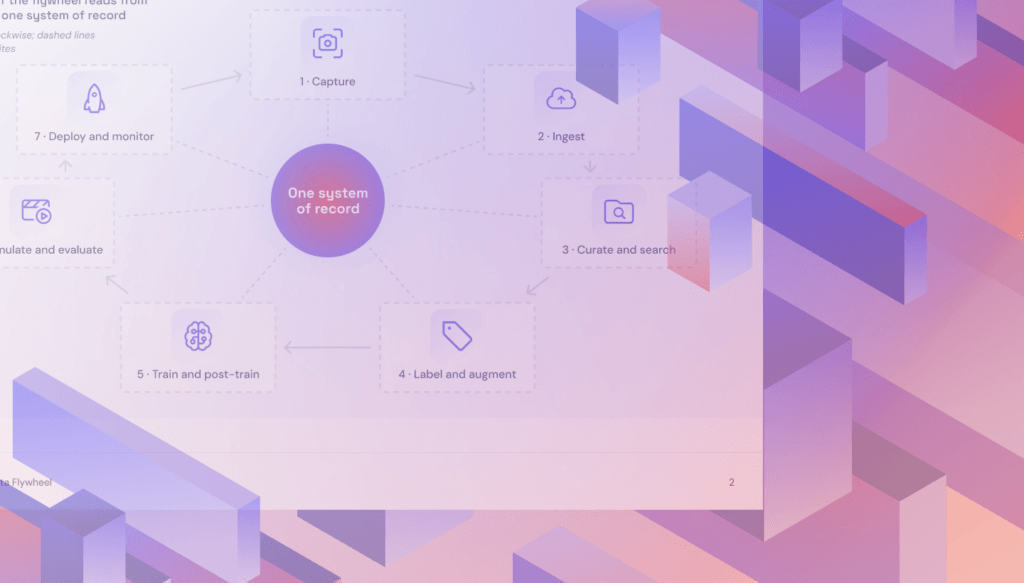
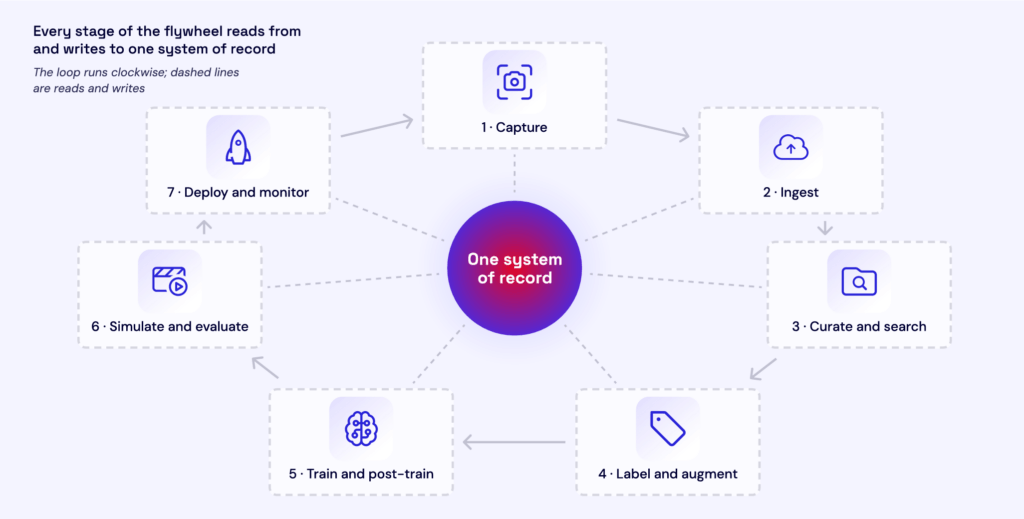
Every deployment can improve the next model only if its data makes it back to training, a loop known as the physical AI data flywheel.
Key takeaways
- Physical AI systems learn from camera, LiDAR, radar, and telemetry data collected in the field, and a single test vehicle can record more than 200 TB in an eight-hour shift.
- S3-compatible object storage is the standard system of record for physical AI training data, because it scales without fixed capacity, carries rich metadata, and lets many GPU workers read the same dataset at once.
- Edge cases, disengagements, and incident recordings are the most valuable data a fleet produces, and tagging them with metadata at ingest makes them findable for retraining.
- Training reads the same dataset on every run, so egress fees compound when storage and GPUs sit in different clouds, and storage reachable from any GPU provider lets teams change compute without migrating the dataset.
- After an incident, recordings of what a fleet saw and did become evidence, so retention policies and write once, read many (WORM) protection belong in the storage design from the start.
What data physical AI produces, and how much
Physical AI data is large, multimodal, and written once but read many times. Robotics data storage, for example, has to accommodate video, point clouds, radar, and telemetry from the same machine. A raw recording gets read again for every training run, reprocessing pass, and simulation replay, so storage gets judged on how it handles reads as much as on capacity.
In ROS-based systems, teams use rosbag tools to record and replay messages from cameras, LiDAR, and other sensors. ROS 2 uses rosbag2, which supports recording formats including MCAP. Other pipelines use formats such as ASAM MDF4 (.mf4). These recordings preserve sensor streams from a drive or shift; downstream processing can extract the streams and samples a training job needs.
Volume depends on sensor count, and it varies by orders of magnitude. DXC Technology estimated in 2022 that a single test vehicle can record more than 200 TB of raw data in an eight-hour shift. A year earlier, KIT put test drives at 4 TB to 8 TB per vehicle per day. Development fleets with dense sensor rigs sit near the top of that range, and production fleets that upload only selected clips sit far below it. Sensor counts have only gone up since these estimates were published, so treat them as a floor.
Training sets are smaller than the raw archive, but still large. NVIDIA’s PhysicalAI-Autonomous-Vehicles dataset holds 1,700 hours of driving in 133TB, stored as separate files per sensor.
Object storage vs. file storage for camera and LiDAR training data
Object storage is the better fit for a growing archive of camera and LiDAR recordings. Sensor recordings are written once and read by many GPU workers at the same time, which suits object storage because it scales without a capacity ceiling, keeps metadata with each object, and serves any number of readers over HTTP through the S3 API. File storage is built for files that change: its POSIX guarantees let tools edit, rename, and lock files in place. Raw recordings almost never change after they’re written, so they rarely need those features.
Some tools still need those guarantees, so many physical AI stacks use both: object storage as the system of record, and file storage where a specific tool demands it.
Is object storage good for LiDAR and point cloud data?
Yes. A LiDAR sweep follows the same write-once, read-many pattern as video. It gets captured, stored, referenced by labels, and read in training without ever being edited. NVIDIA’s AV dataset, for example, stores point clouds as per-clip files alongside camera and radar data.
Point cloud formats are adapting to object storage, too. COPC, a variant of the LAZ format used for aerial and survey LiDAR, organizes points so a client can fetch only the region and level of detail it needs with HTTP range requests, instead of downloading the whole file.
Where file storage still fits
Some tools need a real file system. Anything that renames, overwrites, or locks files in place expects POSIX behavior. File clients that mount a bucket handle reads and new files but stop there: Mountpoint for Amazon S3, for example, can’t modify existing files and doesn’t support file locking.
Small files are the other problem, and they slow down file and object storage alike. A training set stored as millions of individual frames and per-frame labels can spend more time opening files than reading them. Training pipelines pack samples into large shards, such as WebDataset tar files, so each read pulls thousands of samples at once.
How to move fleet data from the edge to GPU training
Ingest is usually the first bottleneck in a physical AI pipeline. A process that works for a handful of pilot vehicles breaks once fleet size and sensor counts grow together, and that’s usually when teams redesign the path from vehicle to training cluster.
Getting data off the vehicle or robot
Development vehicles record far more than a cellular link can carry, so they offload at the depot. DXC puts a test car at about 28 TB of data an hour, with 30 to 60 minutes to offload it over fiber after a shift. Multiply that across a fleet and the depot becomes its own bottleneck: Continental’s test fleet drives 15,000 km a day and records more than 100 TB. That’s why some teams skip the network entirely, pulling drive cartridges and shipping them to the training data center.
Production fleets work differently. They keep a rolling buffer onboard and upload only short clips around trigger events, such as a hard brake or a disengagement, which are small enough to send over cellular. Robots that return to a charging dock, such as delivery and warehouse robots, can also upload in bulk over the dock’s network each time they charge. In every case, multipart uploads let an interrupted transfer resume from the last completed part instead of starting over.
Organizing data so you can find edge cases later
How you name and tag data at ingest decides what engineers can find six months later. Keys organized by vehicle, date, drive, and sensor let a single prefix listing return a whole drive or one sensor stream:
fleet/{vehicle_id}/{date}/{drive_id}/{sensor}/
Tags carry what the key can’t. Capture conditions, software version, calibration ID, and edge-case flags go on each object as metadata at upload. That metadata has limits, though: on Amazon S3, user-defined metadata is limited to 2 KB and can’t be changed after upload. Anything found later, such as labels or a newly flagged scenario, belongs in a catalog or table that points back to the objects.
Training sets work the same way. A manifest lists the frames and labels in a dataset and assigns each frame to a split, so two teams can build different datasets over the same recordings without copying them.
Labeling and feeding training without extra copies
S3-compatible storage for AI training lets labeling and training pipelines reference the same underlying recordings. Labeling tools can work directly against the bucket. CVAT, for example, attaches S3-compatible storage and builds annotation tasks from a manifest file, so frames stay where they are. Training jobs stream sharded data, such as WebDataset tar files, straight from object storage with no full local copy. Every copy you avoid is one less dataset to keep in sync, and one less storage bill.
Get the White Paper
Every deployment captures something your next model could learn from. Learn how to retain valuable video and sensor data, keep it accessible across GPU providers, and manage storage costs as your fleet grows.
Should you keep raw sensor data after edge processing?
Keep raw data by default, and cut routine recordings down to edge summaries only when they have no training value. A fleet’s own data is the scarcest training input it has, because no one else recorded its machines in its environments. Once deleted, raw sensor data can’t be recreated, and the old cost argument for deleting it has weakened because hot storage with no minimum retention period makes keeping more data cheaper than many teams assume.
The exceptions depend on what the data is for. If a robot only reports position and task status, summaries are enough. If field data retrains a perception model, even routine operation is training data, because it keeps training sets balanced and gives regression tests a baseline. And anything unusual in that data, such as near misses, disengagements, sensors that disagree, and scenes the model handled poorly, is the most valuable footage in the archive.
Rare events are the hardest data to replace. When Volvo’s large-animal detection, built for moose, struggled with kangaroos, its engineers traveled to Australia to film them. Eighteen months later, they still didn’t have reliable detection. Every edge case a fleet already captured is one it never has to go looking for.
Because those clips are so hard to replace, deletion rules need guardrails. Lifecycle rules that delete by age alone can remove an edge case before anyone labels it. Writing flagged clips under a separate prefix at ingest lets teams scope deletion rules to the routine-data prefix, since a lifecycle rule applies to every file under its prefix.
How to keep training data portable across GPU providers
Compute moves more often than data. Teams run a mix of on-prem clusters and cloud GPUs, and many shop between cloud providers for spot capacity on price, availability, and region. If the training dataset had to follow every move, each one would bring a migration and a transfer bill, so the dataset should stay in one place, reachable from any GPU provider.
How egress fees affect training across multiple GPU clouds
When storage and GPUs sit in different clouds, every byte that crosses between them is billable egress, whether the GPUs stream the dataset or train from a copy. Streaming the dataset to remote GPUs pays egress on every training pass. Copying it to the GPU provider first pays once per copy, then adds storage for the duplicate and a recopy every time new fleet data arrives.
The numbers get large fast. At Amazon S3’s list prices for internet egress, one full pass over a 1 PB dataset costs more than $50,000, and ten passes in a month cost roughly $500,000. Negotiated discounts change the totals, but can still balloon out of control fast.
How to switch GPU providers without migrating your training dataset
Keep the dataset in one S3-compatible bucket and point each new cluster at the same endpoint. The S3 API works the same from any provider, so switching compute becomes a credentials change instead of a migration.
The catch is distance. Streaming across clouds adds latency that can leave GPUs waiting on data, so teams cache hot shards near the GPUs or choose storage with high-throughput network paths to their GPU provider.
How to avoid lock-in for video and sensor training data
Exit fees are easier to escape than they used to be. AWS waives egress for customers moving their data out, though the waiver covers leaving, not the cross-cloud reads that multi-cloud training creates every month.
Waived exit fees don’t remove the rest of the lock-in. If your storage comes with a GPU contract, you can’t move compute without renegotiating storage. If a vendor keeps your data in its own formats, you have to convert every file before you leave. And if your dataset catalog only runs on one platform, you lose track of what’s in your archive the moment you move. Open formats, the S3 API, and a catalog you run yourself keep each of those exits open.
Why hot storage matters for retraining
Retraining revisits old fleet data. A new model architecture, a new sensor, or a new failure mode can send engineers back to recordings from last year. Archive tiers make that slow and expensive: the coldest take hours to restore, and most add per-GB retrieval fees and minimum storage durations. Keeping the training archive in hot storage skips the restore and keeps every recording one request away.
Retaining sensor data for incident investigation and audits
When a physical system fails, the recording is the evidence. Kinetic accountability is the ability to produce a reliable, unaltered record of what a fleet captured and did, and it turns retention and integrity into safety and liability requirements
How long should you retain vehicle or robot sensor data?
No single rule sets a retention period for sensor data, but two US obligations set the floor. NHTSA’s Standing General Order requires companies operating automated driving systems or Level 2 driver assistance to report certain crashes. Once litigation is reasonably likely, the duty to preserve evidence applies, and federal courts can sanction the loss of electronic records that should have been kept.
That leaves two separate decisions. The first is a routine retention period, which legal counsel should set by jurisdiction and use case. The second is immediate preservation: when an incident happens, the related recordings go under a legal hold that overrides any lifecycle deletion.
How to make sensor logs tamper-proof for audits
Integrity starts at capture. Hash each recording on the vehicle before upload, so the chain of custody begins at the sensor instead of at the bucket. From there:
- Write recordings to write once, read many (WORM) storage with object locking. Compliance mode stops anyone, administrators included, from shortening or removing a lock, while governance mode lets privileged users bypass it.
- Put incident recordings under a legal hold, which locks them indefinitely, independent of any retention period.
- Turn on access logging, so you can show who read what and when.
- Separate credentials, so the account that writes data can’t delete it.
Handling faces, license plates, and patient data
Data retention and privacy pull in opposite directions. Safety and liability pull toward keeping recordings, and privacy rules pull toward deleting footage of bystanders. EU data protection guidance treats video of identifiable people, including license plates, as personal data that shouldn’t be kept longer than necessary. A common way to serve both is to keep raw incident recordings under restricted access and train on redacted copies, with faces and plates blurred.
How storage needs differ by industry
Four things change from one industry to the next: how much data each machine produces, how that data gets off the machine, what has to stay raw, and which retention or privacy rules apply.
Autonomous trucking
Autonomous trucks record through dense sensor stacks and offload in bulk at the terminal. Aurora’s trucks carry about 25 cameras and sensors, including LiDAR and radar, and its Texas terminal has data offload stations that look like gas pumps. At that volume, the training archive gets hard to move once it’s built. When Kodiak’s on-prem hardware hit its ceiling, the team needed more compute without moving petabytes of sensor data, so it streamed hundreds of terabytes to a GPU cloud through an S3 interface. Kodiak also builds its training sets around rare and edge-case scenarios, which only works if those clips were kept raw. Reportable crashes fall under NHTSA’s crash-reporting order, so incident recordings go under a legal hold right away.
Surgical robotics
Surgical robots record continuous endoscope video, and that video is becoming training data. Johns Hopkins researchers trained the SRT-H robot on video of surgeons removing gallbladders from pig cadavers, with captions describing each task, and the robot then performed a 17-task phase of the procedure nearly autonomously. Surgical video also carries a constraint specific to healthcare: video that can identify a patient is protected health information, and HHS’s de-identification guidance lists full-face photographs and comparable images among the identifiers to remove. A common approach is to train on de-identified copies, while the original recordings follow the provider’s medical-record retention policy.
Drones
Drone inspection programs outgrow general-purpose storage quickly. One Northeast utility found its drone program had filled 8.5 TB of a 10 TB SharePoint allocation with transmission line images and video, while five or six separate teams needed access to the same data. Inspection sites rarely have reliable connectivity, so footage comes off when the aircraft returns to power and Wi-Fi, then moves into training as a batch. The raw imagery worth keeping is footage of flagged defects and disputed assets, because replacing it means sending a crew to fly the route again.
Last-mile delivery robots
Sidewalk delivery robots film continuously, and nearly all of that footage shows ordinary sidewalks. That makes retention a privacy decision first. Serve Robotics routinely deletes its robots’ camera feeds unless there’s a compelling safety or security reason to keep them, and the exceptions show why those reasons matter: when two men tried to steal one of its robots in Los Angeles, Serve shared the footage with police, who arrested them. The clips worth keeping raw are collisions, vandalism, and navigation failures, and navigation models can train on redacted copies of the rest.
Agriculture
Farm robots work where cellular coverage is weak or absent, so they make decisions on board and sync data when they can. Carbon Robotics’ LaserWeeders process images on onboard NVIDIA GPUs and keep a two-way data link over satellite internet, and new field scenarios feed back into retraining. That data compounds across a fleet: Carbon trained its plant-identification model on more than 150 million photos and data points from machines on more than 100 farms in 15 countries. Before that model, every new weed meant new labels and about 24 hours of retraining. Images of new weeds, unfamiliar crops, and misclassifications are still the ones worth keeping raw, because they’re exactly what the next model has to learn.
How to evaluate cloud storage for physical AI
The best fit for video and sensor training data is S3-compatible object storage that sustains high throughput under parallel load, doesn’t charge for the data movement training creates, keeps the archive hot, and supports object locking.
The one exception is a team that keeps storage and GPUs with a single hyperscaler for good. Same-region transfers carry no egress fees, but the training archive is then tied to that provider’s GPU capacity and pricing. The other options matter when training spans GPU providers, compute moves, or the archive gets reread often.
Questions to ask a provider about AI training data storage
- What sustained throughput holds up under multi-threaded load, and what are the documented rate limits?
- What does it cost to move data to where training runs, counting egress and request fees?
- Are there minimum storage durations or retrieval fees?
- Which object lock modes and access logs are supported?
- How does it perform on a test with your own files? Vendor benchmarks reflect best-case conditions.
How the main options compare
| Category | S3 API | Data movement costs | Tiering and retrieval | Operational burden |
|---|---|---|---|---|
| Hyperscalers (Amazon S3, Google Cloud Storage, Azure Blob Storage) | Native on Amazon S3; varies on others | Free within a region; per-GB egress to other clouds | Multiple tiers; colder tiers add retrieval fees and minimum durations | Managed |
| Specialized S3-compatible clouds | Compatible | Low or no egress fees; terms vary | Varies; some keep everything hot | Managed |
| Storage tied to a compute provider | Usually compatible | Low cost within that provider; fees or friction to reach other GPUs | Varies | Managed |
| Self-managed object storage | Usually compatible | No provider fees; you pay for network and hardware | Your design | Your team runs hardware, scaling, and durability |
Frequently asked questions
Can you train directly from object storage, or do you need a file system cache?
You can train directly from object storage when the data is packed into large shards and the network path to the GPUs is fast. A file system or local cache helps when the same hot shards get read repeatedly, when a tool needs POSIX behavior, or when storage sits in a different cloud from the GPUs. Many teams use both, with object storage as the system of record and a cache near the GPUs.
Where should synthetic and third-party training data live?
Store them alongside field recordings, with clear records of their origin. Synthetic data generated with NVIDIA Isaac Sim and robot demonstrations from datasets such as Open X-Embodiment can supplement a fleet’s own data. Track the source, license, simulator version where applicable, and preprocessing history so engineers can trace what went into each training set. A shared catalog can reference these sources without forcing every dataset into the same file format.
Do you need a table format or data lakehouse on top of object storage?
You don’t need one to start, but most teams add one as the catalog grows. Recordings stay as objects, and a table format such as Apache Iceberg or Delta Lake adds queryable metadata, versioned datasets, and schema changes over time. It’s also the natural home for labels and flags discovered after upload, since object metadata can’t change once written.
What’s the difference between hot and cold storage for training data?
Hot storage serves data immediately. Cold or archive storage costs less per terabyte but adds restore delays, retrieval fees, or minimum storage durations. Training data that gets reread for retraining belongs in hot storage, and cold tiers suit data kept for compliance and rarely read.