Extensive news coverage and analyst reports on AI missing productivity and ROI targets mean that AI failure is something of a hot topic. There’s no arguing that some AI initiatives are misguided, including replacing entire specialist teams with AI. For others, the issue actually lies with data knowledge and readiness–Gartner predicts that through 2026, organizations will abandon 60% of AI projects unsupported by AI-ready data, and S&P Global recently highlighted the importance of ingesting previously overlooked or unknown data to discover interdependencies in risk management.
The pressure to move at the perceived speed of AI makes it easy to skip or rush important prep work. Now that major AI pilots have been up and running, supplementing or sometimes entirely replacing select business functions with mixed results, this exposes an already known problem among AI experts: implementing AI too quickly and ignoring the importance of keeping human experts in the loop increases your threshold for error. This is especially prevalent for both internal AI tools that are meant to augment key roles, and customer-facing AI applications that are supposed to increase accessibility to an outcome, such as generating a lifelike video based on natural language prompts.
What’s causing this? It’s not just the LLMs–it’s the data. Now that human experts are more aware of what AI can get wrong, we’re going back to basics to help you get it right. This starts at the very beginning: curating, ingesting, and storing data using infrastructure that’s actually designed for moving data quickly, and without financial penalty.
The Stages of the AI Model Training Data Pipeline
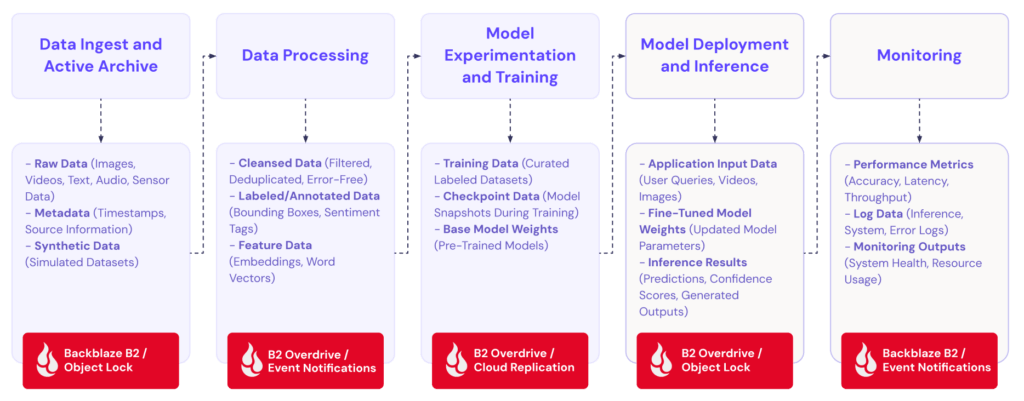
Our in-house AI experts have split the AI data pipeline into five essential key phases for model training, and highlighting how storage factors into each stage (including what’s being stored.)
Data collection ≠ data ingest
Data ingest is the process of any type of data being added to a designated collection destination, whether that’s a specific file folder, database, or object storage bucket. For a lot of applications, data ingest is frequent or nearly constant–busy e-commerce sites with a constant flow of customer transactions and feedback, live video feeds, and combining real-time data sources like pairing security footage with physical building security sensors. This is called streaming ingestion–and streaming ingestion being the foundation of data collection for various types of AI is one of the key reasons why storage is an AI infrastructure problem that often flies under the radar until there’s a serious problem.
- Streaming ingestion requires constant low-latency access to the data storage repository to prevent data upload lags and errors.
- Streaming ingestion for video and other large files requires high rate limits and high-throughput networking capabilities to optimize upload times, especially when an application requires a file to be ready for processing in seconds/minutes instead of hours/days.
- Running out of storage capacity is not an option for model performance, and for compliance and auditing purposes–streaming ingestion requires constant access to storage that is as close to infinite as possible.
Automation from the start
In addition to the files themselves, setting up a highly effective AI data pipeline involves building automation from the very beginning to immediately allocate files to the right bucket using taxonomy and collect and store file metadata to begin data aggregation critical for future labeling and processing.
Why taxonomy is critical for AI
The file itself is the data source. Navigating your dataset starts with implementing a taxonomy that makes your dataset highly searchable as your data grows from a few thousand for your first round of training to millions for an AI application operating in production.
Taxonomy is essentially your file storage structure, or how files are automatically “nested” and relationships between files are built immediately upon ingest. When you’re just getting started, developing your taxonomy helps you stay organized and ready to go searching for a specific file when your coworker doesn’t believe what the data is saying. When you’re working in established teams, implementing a new taxonomy or showing that you understand the importance of following an established taxonomy builds a contract of understanding between you and your data engineering or ML teams. (AKA, changing taxonomy mid-project is a big undertaking with ripple effects, and should not be taken lightly.)
A simple example taxonomy for ingesting raw files can look like this:
/<source>/<modality>/<status>/<date>/filename
Taxonomy should also reflect what the data is actually doing or will do, not just the file type and data source. The goal is to make every object self-describing at write time, so downstream training pipelines can filter, version, and partition without touching the data itself.
- Partition by date/time at the prefix level so you can use time-range queries and lifecycle rules without scanning everything
- Include modality (video, audio, image, text) as a top-level segment so cross-modal datasets stay logically separated but co-located in the same bucket
- Use a UUID or content hash as the filename — never rely on source filenames, which are inconsistent and collision-prone at scale
- Use B2 bucket policies or object tagging rules to reject objects written to non-conforming prefixes
- Maintain a human-readable taxonomy manifest (taxonomy.json at bucket root) that documents each top-level prefix and its schema
- For video specifically, consider a separate prefix segment for resolution or codec: …/video/4k/h264/… — this pays off quickly when training jobs need to filter by input spec
Retain all the metadata
Write metadata as object tags and custom headers at ingest using per-object user-defined metadata at PUT, such as:
s3.put_object(
    Bucket="for-training",
    Key=object_key,
    Body=video_bytes,
    Metadata={
        "source-id": "warehouse-camera-feed-8",
        "capture-timestamp": "2026-07-08T14:32:00Z",
        "frame-rate": "30",
        "resolution": "3840x2160",
        "modality": "video",
        "label-status": "unlabeled",
        "ingest-pipeline-version": "v2.3.1"
    }
)
This way, the metadata travels with the object and is always returned on HEAD requests without a separate lookup.
But to build out a rich dataset, you will need even more metadata in the form of sidecar metadata files. Retain annotations, bounding boxes, ground-truth labels, licensing info, and consent flag metadata by creating a sidecar JSON with a .meta.json suffix. For the warehouse camera video example listed above, you would end up with two files that look like this:
for-training/video/warehouse-camera-feed-8/2026/07/08/14/a3f9c1d2.mp4

for-training/video/warehouse-camera-feed-8/2026/07/08/14/a3f9c1d2.meta.json
Enable object versioning on training buckets. If a labeling pipeline updates an annotation, it should write a new version (or a new sidecar) rather than overwriting — training reproducibility depends on knowing which metadata was present at the time a dataset was compiled.
Expose metadata to training pipelines via a manifest
Rather than having training jobs scan bucket prefixes directly, generate a manifest file (JSONL or Parquet) at the end of each ingest batch that enumerates every object key + its full metadata. Tools like PyTorch’s WebDataset and HuggingFace datasets can load directly from these manifests, and it decouples the training job from needing object storage credentials for discovery.
Deciding on storage while evaluating data
To summarize, this is why choosing your storage destination based on your current (or, if you’re already undergoing a data management transformation, future-state) scenario is critical:
- Ingest type: Does your storage provide enough network bandwidth to capture the correct type of data in real time (especially for video?)
- Data type: Will large files potentially incur large upfront costs with upload fees?
- Data processing workflow: Does your storage have capacity headroom for file multiplication during processing, and does the cost structure allow this to happen without potentially draining infrastructure budgets?
Even with Backblaze B2’s hot storage at cold storage pricing, it may be beneficial for you to tier your storage based on your ingestion type, and how frequently the data will be accessed for training.
- Batch ingestion is better suited for mid to lower performance storage, as this is typically used for historical datasets or a set schedule of pre-determined data updates, such as jobs pulling from relational databases or CSV uploads once a day or once per week.
- Streaming ingestion is well-suited for hot storage to support a continuous stream of real-time (or near-real-time) data processing, such as from social media feeds and high-volume e-commerce AI helper agents.
- Hybrid ingestion uses a combination of batch and streaming ingestion to handle both historical and real-time data requirements for AI models.
Surprise retrieval penalties for model training can happen even while building out your MVP or proof of concept–so avoid a storage headache and start building your pipeline at data ingest with Backblaze B2 $6.95 per TB/month. Create an account to get started with 10GB for free, or contact our storage experts for assistance with migrations and more.
Looking for more info on data ingest? Watch the on-demand webinar that dives into more details about data ingest with Backblaze’s Director of Applied AI Jeronimo De Leon.